Coming Soon
Local Hosting
Run it, share it, ship it. From one window.
A desktop app that hosts your web apps on your own machine, puts them on the internet, and deploys them to the cloud when you're ready.
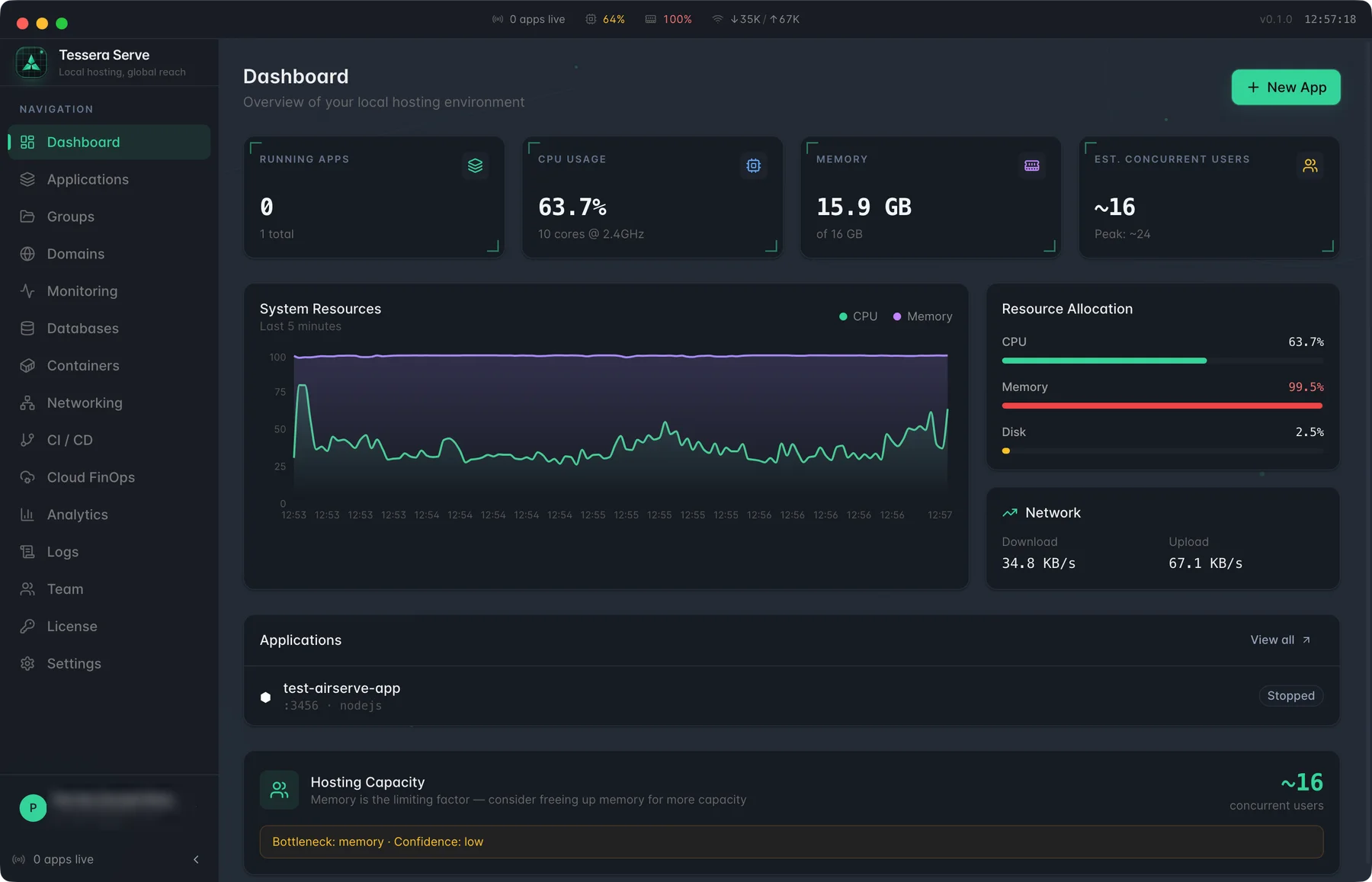
TESSERA SERVE · DASHBOARD
14
Project types detected
5
Cloud targets
Built for
Freelancers showing clients
Small dev teams
Workshop leaders
Side projects going live
What it solves
The problem, and what changes.
Before
With Tessera Serve
01
A terminal for the dev server, another for the tunnel, and a Dockerfile nobody finished.
Serve works out what the project is, keeps it running, and shows it all in one place.
02
The link the client was sent has no password on it.
Public tunnels and your own domains, with password protection and rate limiting.
03
The side project has to be on AWS by Friday.
It writes the Dockerfile and deploys to AWS, Google Cloud or Azure, with the cost estimated first.
The ritual
Six windows to show one prototype.
A terminal for the dev server, another for the tunnel, an env file nobody filled in, a Dockerfile nobody finished, a cloud console on step four of nine — and the link the client was sent has no password on it.
orders-api — zsh
Tab 1$ npm run dev
ready on localhost:3000
port 3000 in use → 3001
Which one was it?
localhost:3000
:3001
:5173
:8080
tunnel — zsh
Tab 2Forwarding → localhost:3001
https://7f3a-91e2.tunnel.dev
no auth · open to anyone
Cloud console
Step 4 of 9Image URI
required
Task role
required
CPU / Memory
0.5 vCPU · 1 GB
.env.production
BlankDATABASE_URL=
SESSION_SECRET=
# which one is prod?
Dockerfile
UnfinishedFROM node:20-alpine
COPY . .
# TODO build step?
Developer
Four tabs open to show one app.
Client
Gets a link with no password on it.
Team lead
No view of what is running where.
One window
Run it, share it, ship it — from one place.
Serve works out what the project is, keeps it running, puts it on a public URL behind a password, records every request at its own proxy, and writes the Dockerfile when it is time to ship. It leaves you one decision.
Tessera Serve
· orders-api
RunningDetected
Node · port 3000 · .env loaded
Running
Supervised · restarts on a crash
Exposed
Public URL · password on
Watched
Every request, at the proxy
Ship
Dockerfile written · checked
All apps
2 runningorders-api
running
docs-site
running
billing-worker
stopped
Deploy orders-api
AWS ECS · 0.5 vCPU · 1 GB
Pre-deploy check passed
Credentials not stored
The ritual
Six windows to show one prototype.
A terminal for the dev server, another for the tunnel, an env file nobody filled in, a Dockerfile nobody finished, a cloud console on step four of nine — and the link the client was sent has no password on it.
One window
Run it, share it, ship it — from one place.
Serve works out what the project is, keeps it running, puts it on a public URL behind a password, records every request at its own proxy, and writes the Dockerfile when it is time to ship. It leaves you one decision.
01
The ritual
02
One window
orders-api — zsh
Tab 1$ npm run dev
ready on localhost:3000
port 3000 in use → 3001
Which one was it?
localhost:3000
:3001
:5173
:8080
tunnel — zsh
Tab 2Forwarding → localhost:3001
https://7f3a-91e2.tunnel.dev
no auth · open to anyone
Cloud console
Step 4 of 9Image URI
required
Task role
required
CPU / Memory
0.5 vCPU · 1 GB
.env.production
BlankDATABASE_URL=
SESSION_SECRET=
# which one is prod?
Dockerfile
UnfinishedFROM node:20-alpine
COPY . .
# TODO build step?
Developer
Four tabs open to show one app.
Client
Gets a link with no password on it.
Team lead
No view of what is running where.
Tessera Serve
· orders-api
RunningDetected
Node · port 3000 · .env loaded
Running
Supervised · restarts on a crash
Exposed
Public URL · password on
Watched
Every request, at the proxy
Ship
Dockerfile written · checked
All apps
2 runningorders-api
running
docs-site
running
billing-worker
stopped
Deploy orders-api
AWS ECS · 0.5 vCPU · 1 GB
Pre-deploy check passed
Credentials not stored
Why it's different
The short case for Tessera Serve.
01
14
Project types detected
From a static folder to Django, with no config written.
02
5
Cloud targets
AWS ECS, App Runner, Cloud Run, Azure and Docker Hub.
03
1
Proxy that records it all
Live logs, response times, status codes and top paths per app.
04
3
Apps, free for good
The free tier covers the whole journey, from localhost to the cloud, for three apps.
See it
From localhost to the world, in one app.
06 SCREENS · CLICKTAP TO ENLARGE
Tessera Serve
01 / 06
01
Dashboard
Your local hosting environment at a glance.
See running apps, CPU, memory, and how many concurrent users this machine can take.
Watch system resources over the last five minutes.
Spot the bottleneck — memory, CPU or disk — before it limits you.
Starter
$0
forever
Pro
$12
per month
Team
$29
per seat / month
Enterprise
Custom
annual
Go deeper